
PODs chased, checked and billed, while your team books freight.
An AI back office for small truckload brokers. After a load delivers, FreightOps gets the signed POD from the carrier, checks it and builds the bill-ready packet. Nothing goes out until you click Approve.
No card needed · A human approves every email · Built for 5–30 person brokerages
Pre-launch. 3 design-partner spots.
The job today
No POD, no invoice.
The load is delivered. The shipper cannot be billed until the signed POD is in your hands, and the POD is a photo on a driver's phone.
- The third email to the same dispatcherSomeone on your desk writes it, again, because the first two went unanswered.
- The POD that bouncesIllegible date, missing signature, wrong consignee. You find out when the shipper rejects the bill.
- The invoice nobody openedA payment address that changed, a detention line not on the rate con, a lumper with no receipt.
How it works
From delivered to bill-ready in four steps.
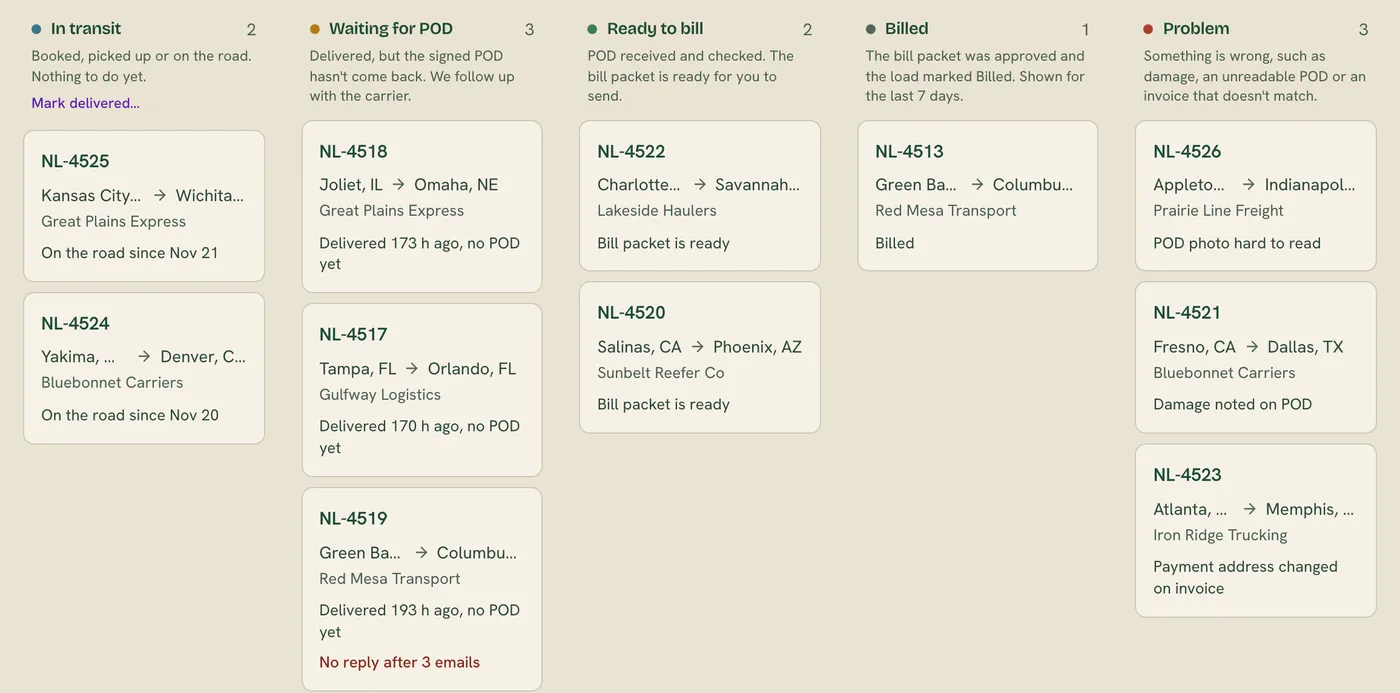
You forward your POD inbox and send a load list. That is the whole setup. The pictures below are the real app, on demo data.
The load delivers
The load is marked delivered. From here, the clock on the signed POD starts.
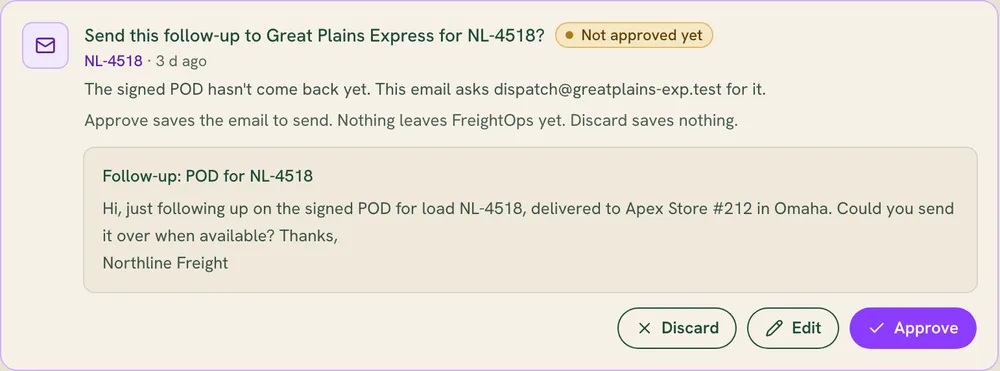
The POD is chased
If the carrier has not sent the POD, FreightOps drafts a polite follow-up to the dispatcher on file. It waits for your Approve.
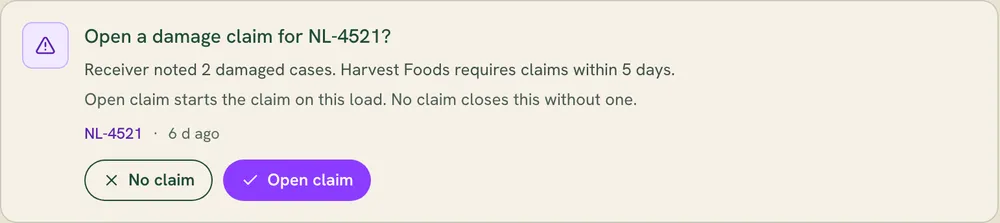
The POD is checked
Unsigned, damage noted, missing pages, wrong load: a problem is flagged and asked about, not buried.
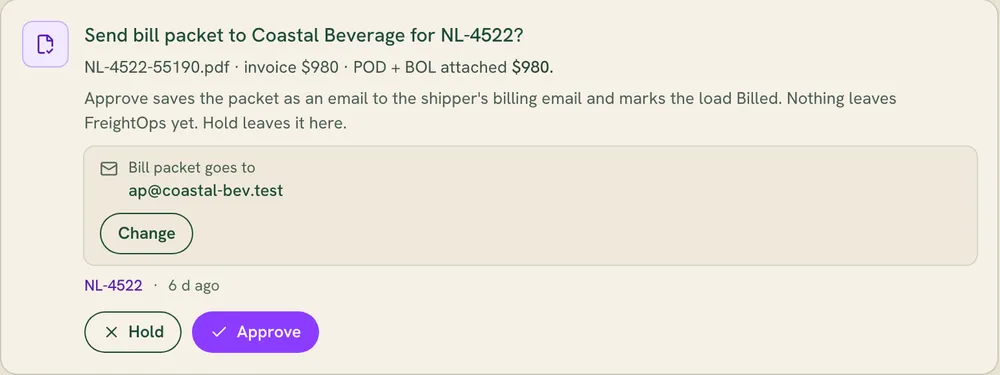
The bill packet is ready to approve
Invoice, POD and BOL are built the way each shipper wants them. You approve it, and only then does it go.
More detail: collecting and checking PODs, chasing and the bill-ready packet.
Carrier invoices
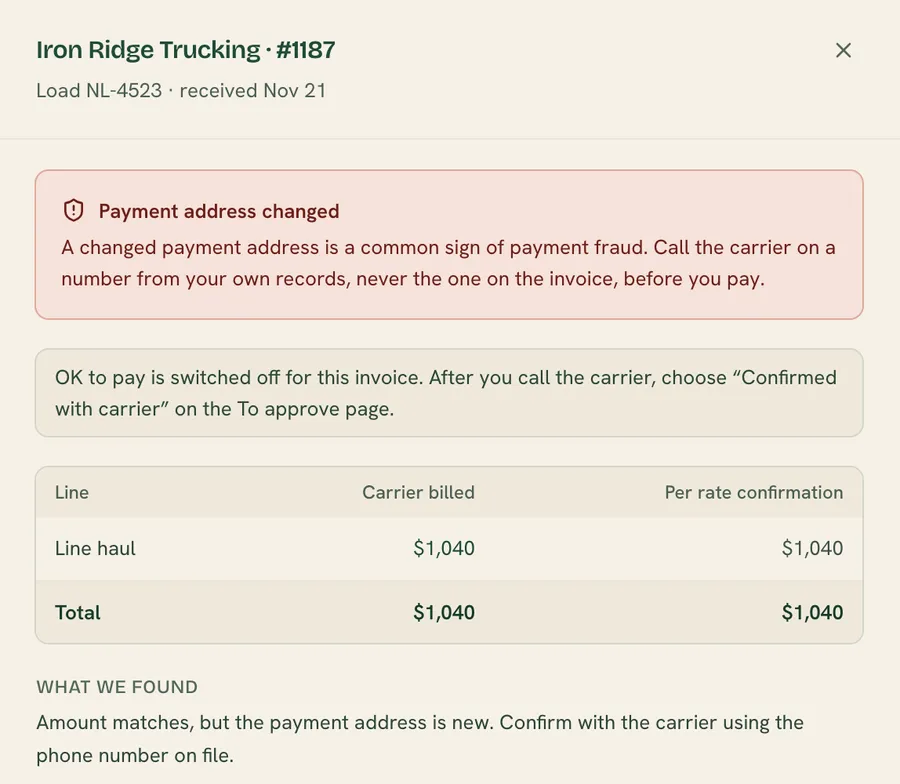
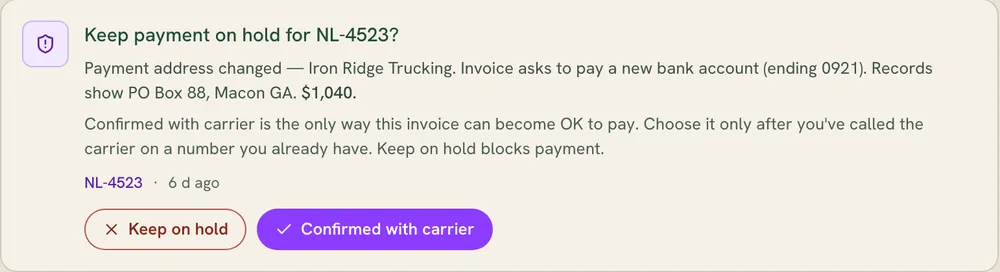
Payment address changed? The invoice is held.
“We changed our bank account” is the classic carrier-payment fraud. FreightOps checks every carrier invoice against the rate con and the address you have on file, and holds any invoice whose payment address changed.
- It stays held until the owner confirms the change with the carrier by phone, on a number from your own records.
- Only that confirmation releases it, and the audit log records who did it.
- FreightOps flags and holds. It does not pay anyone or move money.

You stay in control
Nothing goes out without your click.
- Emails to carriersEvery chase is a draft. You see who it goes to and why. Edit it, send it or skip it.
- Bill packetsBuilt and checked, then held for your Approve. Never sent on their own.
- Carrier invoicesNothing is marked OK to pay by itself, and a changed payment address can only be released by a person.
- When it is not sureA blurry photo or a half-hidden load number goes to a review queue. A wrong attach costs more than a ten-second question.
When we are unsure, we ask
The AI proposes. Plain code checks.
The AI proposes a match; plain code checks it against your loads before anything is filed. Anything it cannot place waits for you.
- Load / BOLNL-45?6 / BOL 6?01452%
- SignedProbably61%
- Signature dateNov 21, 202679%
Photo is tilted and blurry. Load number partly hidden. Not attached to any load until you say so.
Pricing
Free for 20 days. Then pay per closed-out load.
Pre-launch pricing. No seats, no per-page charge. A closed-out load is one with a checked, bill-ready packet.
- You forward your POD inboxCarriers keep emailing the way they do today.
- You send a load listSo documents can be matched to your loads.
- One 20-minute call a weekYou tell us what it got wrong. We fix it.
Your data
Your documents stay yours.
Used only to serve you
Your PODs, rate cons and invoices are used to run your account and for nothing else.
Separate per broker
Each brokerage's documents and loads are kept apart from every other brokerage's.
Originals never changed
The document you forwarded stays exactly as it arrived. What we read from it sits beside it.
Read the plain version on the security page, including what we have not done yet.
A note from the builder
We are early, and we say so.
I am building this for small truckload brokers who still chase PODs by email. It works on sample documents today. I want three brokerages to run it on real ones and tell me what is wrong with it.
You will talk to me directly, every week.
Guides
Plain guides for the back office.
What is a POD in trucking, and what should a broker check on one?
A POD is the signed record that freight was delivered. Here is who signs it, what a usable one shows, and the quick checks a broker should run before billing.
Rate confirmation vs BOL vs POD: what each one is for
Three documents, three jobs. A plain comparison of the rate confirmation, the bill of lading and the proof of delivery, and which ones a broker needs to bill a load.
The bill-ready packet checklist for freight brokers
What goes into a freight invoice packet, the mistakes that make shippers bounce it, and a checklist you can run before you send a bill.
Questions brokers ask.
Does it replace our TMS?
No. It does not connect to a TMS today. You forward your POD inbox and send us a load list, and carry on working the way you do.
Who sends the emails?
You do, in effect. Every chase email is a draft until you click Send. The bill packet is never sent without you either.
What if it misreads a document?
When it is not sure which load a document belongs to, it puts the document in a review queue and asks you. A wrong attach costs more than a ten-second question.
What does it cost after 20 days?
Design partners pay $1.50 per closed-out load for 12 months, with no minimum. List price is $2.50 per closed-out load. This is pre-launch pricing. See pricing.
Will it pay a carrier?
No. It does not move money. It holds an invoice when the remit-to changed and tells you why.

Bill the load. Skip the third email.
Pre-launch pricing. Free for 20 days. 3 spots. A human approves every email.